 Supervisor with "NSX + CTGW/Edge/T0"
This section describes the procedures for deploying a K8s Cluster in a Namespace utilizing an "NSX + CTGW/Edge/T0" architecture inside a vSphere environment.
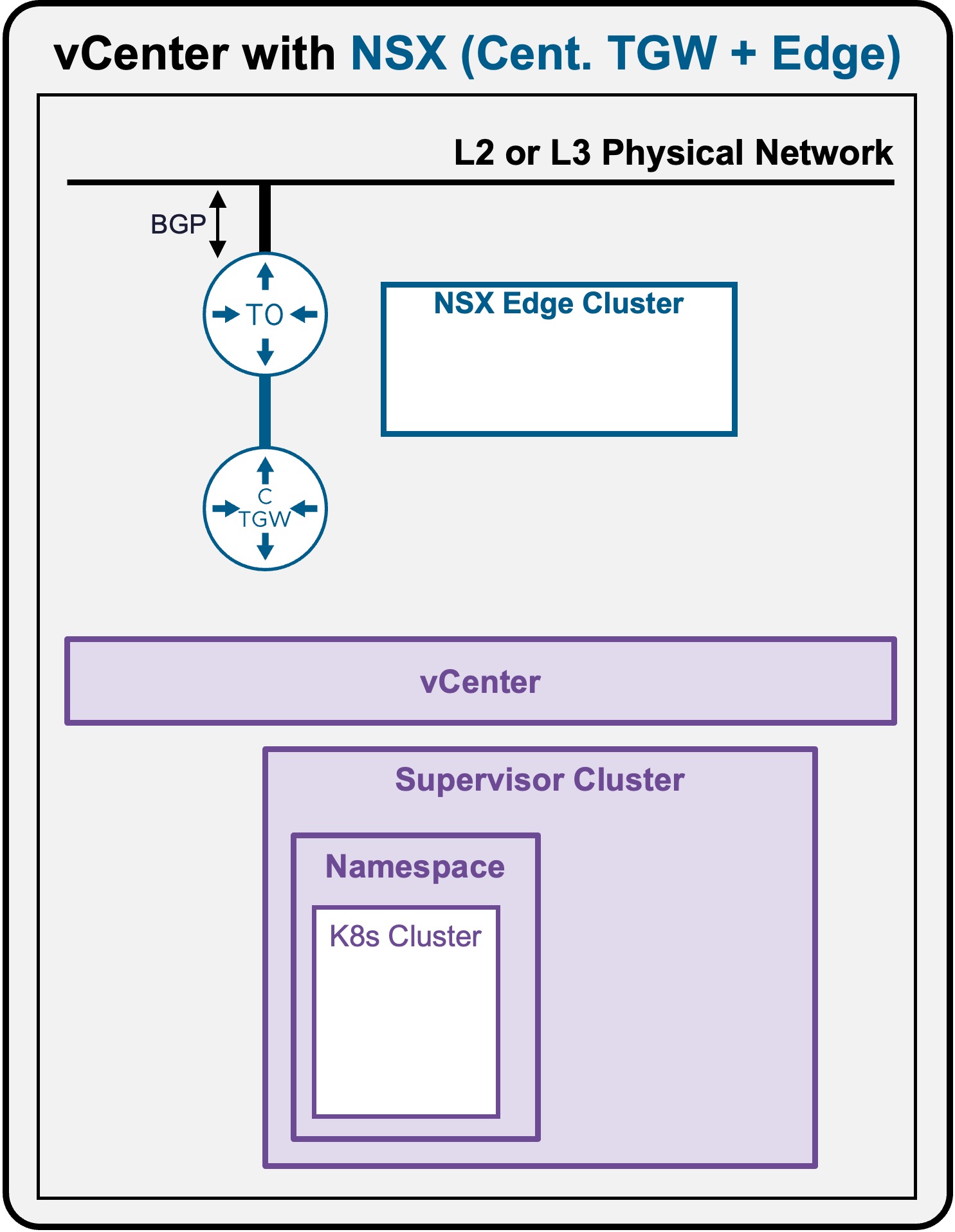
K8s Cluster Deployment
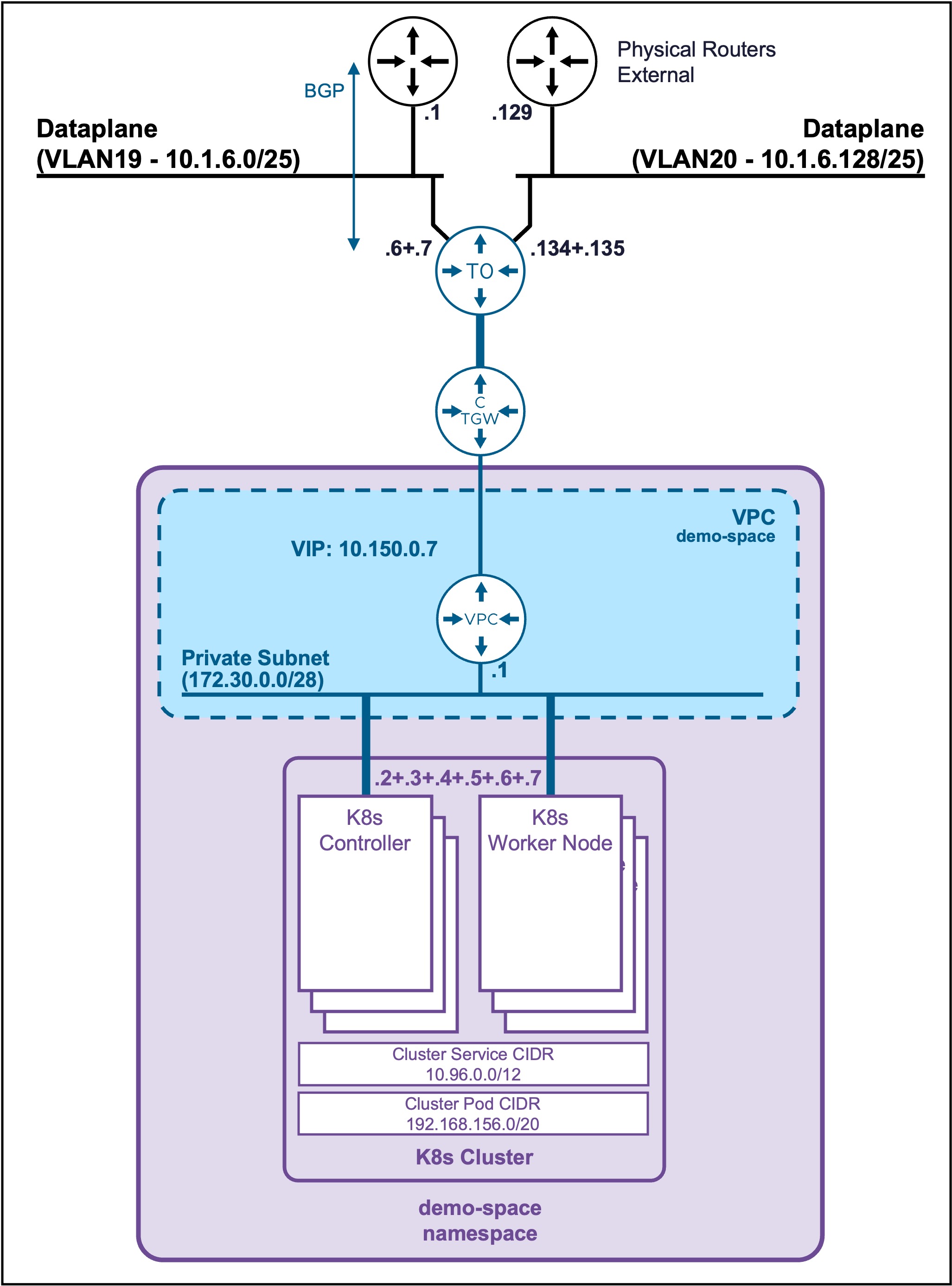
Client Operating System
While the command outputs below are captured from a Windows client, the vcf and kubectl CLI tools operate identically across Linux and macOS environments.
Create K8s Cluster
Connect to the Supervisor
See Supervisor Namespace Access
Check all K8s Cluster resources
-
Check TKR releases available
kubectl get kubernetesreleasesOutput example
PS C:\Users\Administrator\Documents> kubectl get kubernetesreleases NAME VERSION READY COMPATIBLE CREATED TYPEv1.35.5---vmware.1-vkr.1 v1.35.5+vmware.1-vkr.1 True True 4d8h< -
Check VM Class available
kubectl get virtualmachineclassOutput example
PS C:\Users\Administrator\Documents> kubectl get virtualmachineclass NAME CPU MEMORY best-effort-medium 2 8Gi best-effort-small 2 4Gi guaranteed-medium 2 8Gi guaranteed-small 2 4Gi -
Check Storage Class availablee
kubectl get storageclassOutput example
PS C:\Users\Administrator\Documents> kubectl get storageclass NAME PROVISIONER RECLAIMPOLICY VOLUMEBINDINGMODE ALLOWVOLUMEEXPANSION AGEvsan-default-storage-policy csi.vsphere.vmware.com Delete Immediate true 22h
Create the K8s Cluster yaml file
Create file "my-cluster.yaml"
my-cluster.yaml file
apiVersion: cluster.x-k8s.io/v1beta2
kind: Cluster
metadata:
  name: my-cluster
  namespace: demo-space
spec:
  clusterNetwork:
    services:
      cidrBlocks: ["10.96.0.0/12"]
    pods:
      cidrBlocks: ["192.168.156.0/20"]
    serviceDomain: "cluster.local"
  topology:
    classRef:
      name: builtin-generic-v3.6.0
    version: v1.35.5---vmware.1-vkr.1
    controlPlane:
      replicas: 3
    workers:
      machineDeployments:
        - class: node-pool
          name: workers
          metadata:
            annotations:
              cluster.x-k8s.io/cluster-api-autoscaler-node-group-min-size: "3"
              cluster.x-k8s.io/cluster-api-autoscaler-node-group-max-size: "5"
    variables:
      - name: vmClass
        value: best-effort-small
      - name: storageClass
        value: vsan-default-storage-policy
Deploy the K8s Cluster yaml file
kubectl apply -f my-cluster.yaml
Output example
PS C:\Users\Administrator\Documents> kubectl apply -f my-cluster.yaml
cluster.cluster.x-k8s.io/my-cluster created
Validate Deployment
Validate K8s Cluster Status
It takes around 5 minutes to get the K8s Cluster ready
kubectl get cluster
Output example
PS C:\Users\Administrator\Documents> kubectl get cluster
NAME         CLUSTERCLASS             AVAILABLE   CP DESIRED   CP AVAILABLE   CP UP-TO-DATE   W DESIRED   W AVAILABLE   W UP-TO-DATE   PHASE         AGE    VERSION
my-cluster   builtin-generic-v3.6.0   True        3            3              3               3           3             3              Provisioned   7m32s   v1.35.5+vmware.1
Retrieve K8s Cluster Controller VIP
kubectl get cluster my-cluster -o jsonpath='{.spec.controlPlaneEndpoint.host}'
Output example
PS C:\Users\Administrator\Documents> kubectl get cluster my-cluster -o jsonpath='{.spec.controlPlaneEndpoint.host}'
10.150.0.8
Validate K8s Nodes Status
kubectl get machines
Output example
PS C:\Users\Administrator\Documents> kubectl get machines
NAME                                   CLUSTER      NODE NAME                              READY   AVAILABLE   UP-TO-DATE   PHASE     AGE     VERSION
my-cluster-lr2wr-846xb                 my-cluster   my-cluster-lr2wr-846xb                 True    True        True         Running   5m57s   v1.35.5+vmware.1
my-cluster-lr2wr-jg9d2                 my-cluster   my-cluster-lr2wr-jg9d2                 True    True        True         Running   3m47s   v1.35.5+vmware.1
my-cluster-lr2wr-mszdm                 my-cluster   my-cluster-lr2wr-mszdm                 True    True        True         Running   109s    v1.35.5+vmware.1
my-cluster-workers-8nzn6-92xvh-68x8b   my-cluster   my-cluster-workers-8nzn6-92xvh-68x8b   True    True        True         Running   5m47s   v1.35.5+vmware.1
my-cluster-workers-8nzn6-92xvh-chjkb   my-cluster   my-cluster-workers-8nzn6-92xvh-chjkb   True    True        True         Running   5m47s   v1.35.5+vmware.1
my-cluster-workers-8nzn6-92xvh-ksg87   my-cluster   my-cluster-workers-8nzn6-92xvh-ksg87   True    True        True         Running   5m47s   v1.35.5+vmware.1