 Supervisor with "NSX + DTGW/VNA"
This section describes the procedures for deploying a Supervisor utilizing an "NSX + DTGW/VNA" architecture inside a vSphere environment.
- Supervisor
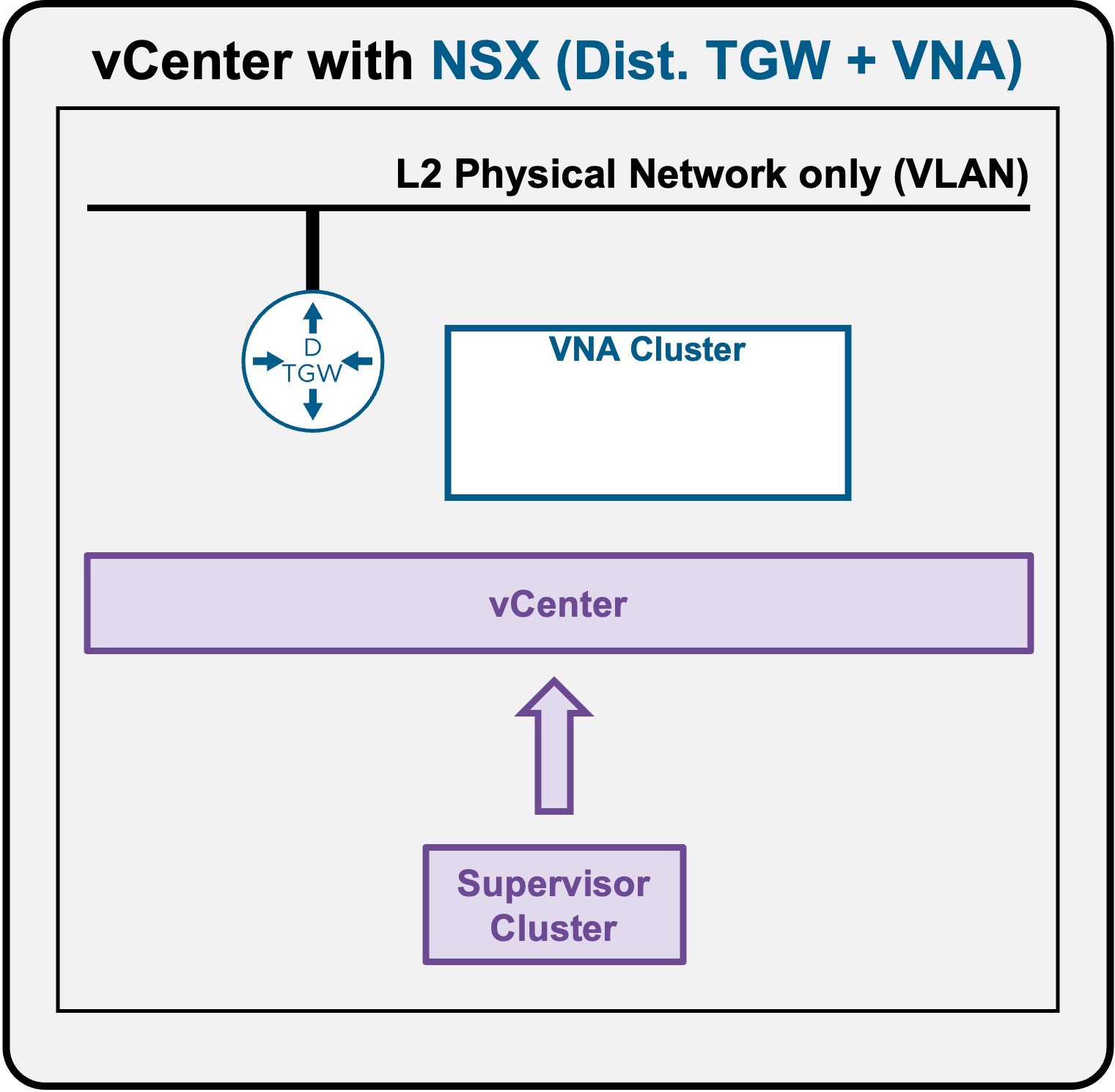
Supervisor Access
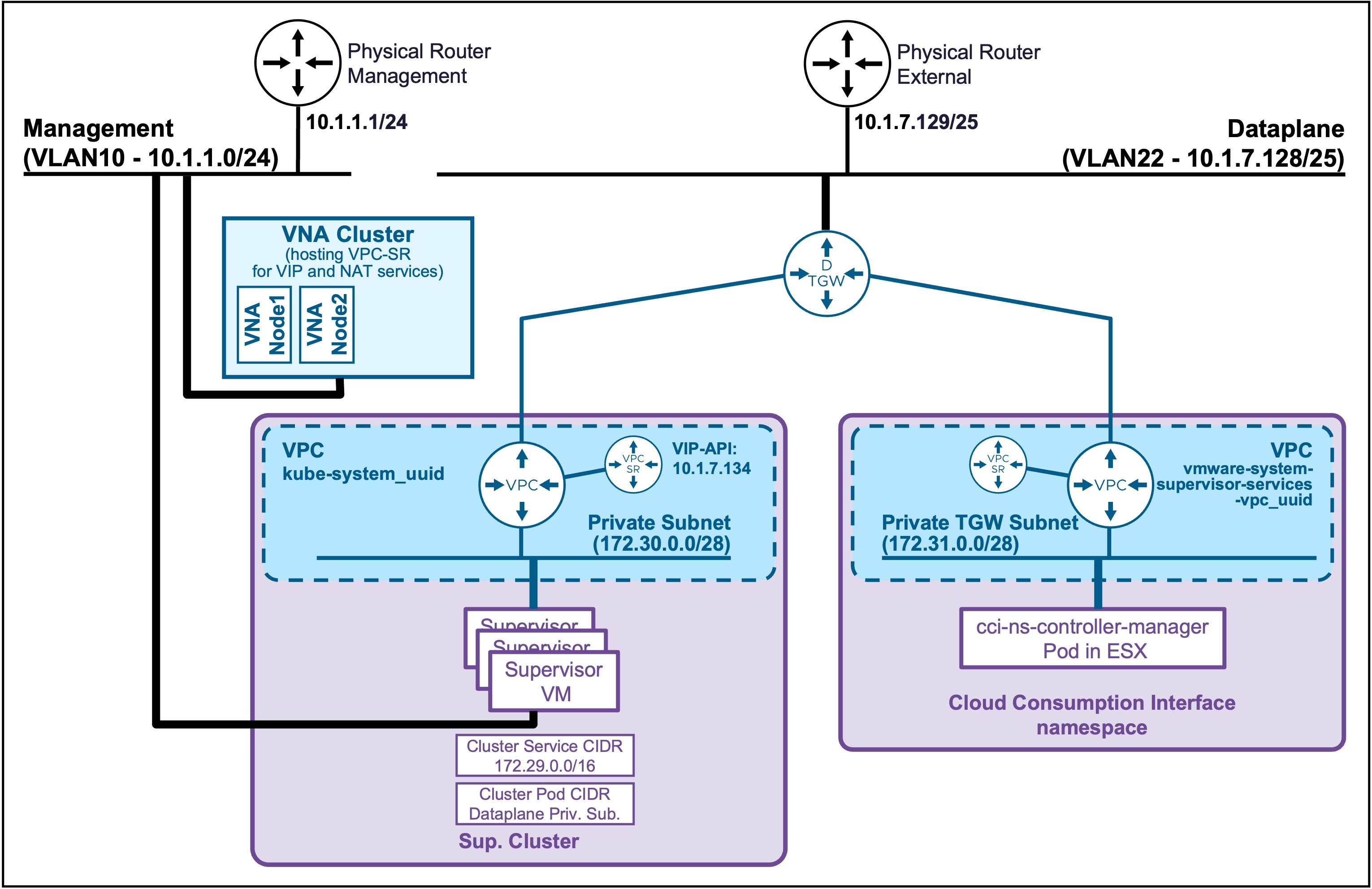
Client Operating System
While the command outputs below are captured from a Windows client, the vcf and kubectl CLI tools operate identically across Linux and macOS environments.
Connect to Supervisor
Find Supervisor Control Plane IP Address
Navigate to vCenter > Supervisor Management > Supervisors.
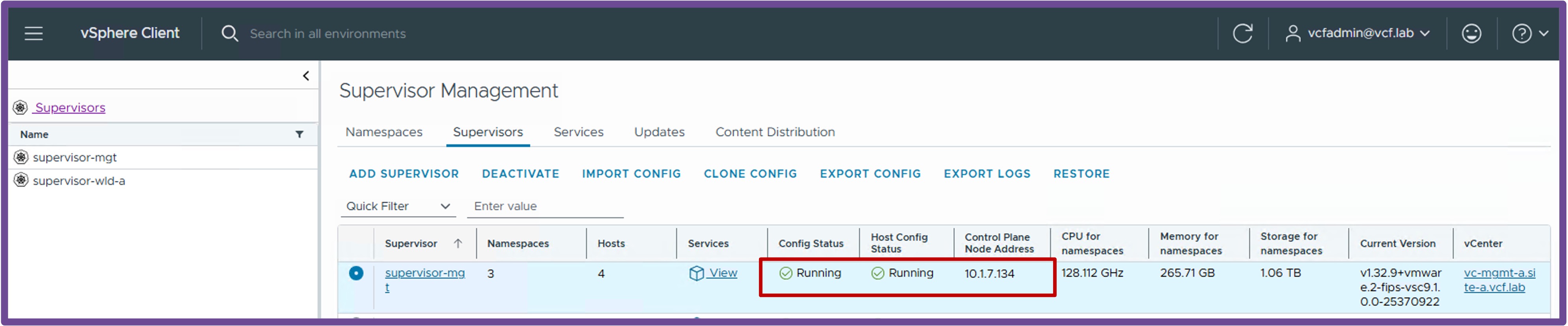
Connect to the Supervisor
From your K8s client:
-
Create once the VCF Context
vcf context create supervisor-mgt --endpoint=10.1.7.134 --type k8s --username administrator@vsphere.local --insecure-skip-tls-verifyOutput example
PS C:\Users\Administrator\Documents> vcf context create supervisor-mgt --endpoint=10.1.7.134 --type k8s --username administrator@vsphere.local --insecure-skip-tls-verify [i] Some initialization of the CLI is required. [i] Let's set things up for you. This will just take a few seconds. [i] Refreshing plugin inventory cache for "projects.packages.broadcom.com/vcf-cli/plugins/plugin-inventory:latest", this will take a few seconds. [i] Reading plugin inventory for "projects.packages.broadcom.com/vcf-cli/plugins/plugin-inventory:latest", this will take a few seconds. [i] [i] Initialization done! [i] == [i] The vcf cli essential plugins have not been installed and are being installed now. The install may take a few seconds. [i] Installing plugins from plugin group 'vmware-vcfcli/essentials:v9.0.2' [i] Installed plugin 'telemetry:v9.0.2' [i] Auth type vSphere SSO detected. Proceeding for authentication... Provide Password: VMware123!VMware123! Logged in successfully. You have access to the following contexts: supervisor-mgt supervisor-mgt:svc-cci-ns-whl2t supervisor-mgt:svc-tkg-f0cpi supervisor-mgt:svc-velero-t234z If the namespace context you wish to use is not in this list, you may need to refresh the context again, or contact your cluster administrator. To change context, use vcf context use <context_name> [ok] successfully saved context: supervisor-mgt [ok] successfully saved context: supervisor-mgt:svc-cci-ns-whl2t [ok] successfully saved context: supervisor-mgt:svc-tkg-f0cpi [ok] successfully saved context: supervisor-mgt:svc-velero-t234z -
Connect to the Supervisor
vcf context use supervisor-mgtOutput example
PS C:\Users\Administrator\Documents> vcf context use supervisor-mgt
[ok] Token is still active. Skipped the token refresh for context "supervisor-mgt"
[i] Successfully activated context 'supervisor-mgt' (Type: kubernetes)
[i] Fetching recommended plugins for active context 'supervisor-mgt'...
[i] Installing the following plugins recommended by context 'supervisor-mgt':
  NAME                INSTALLING
  addon               v3.6.1
  cluster             v3.6.1
  kubernetes-release  v3.6.1
  namespaces          v9.1.0
  package             v3.6.1
  registry-secret     v3.6.1
  vm                  v9.1.0
[i] Installed plugin 'addon:v3.6.1'
[i] Installed plugin 'cluster:v3.6.1'
[i] Installed plugin 'kubernetes-release:v3.6.1'
[i] Installed plugin 'package:v3.6.1'
[i] Installed plugin 'registry-secret:v3.6.1'
Validate Supervisor Access
-
Validate Supervisor Connection
vcf context listOutput example
PS C:\Users\Administrator\Documents> vcf context list NAME CURRENT TYPE supervisor-mgt true kubernetes supervisor-mgt:svc-cci-ns-whl2t false kubernetes supervisor-mgt:svc-tkg-f0cpi false kubernetes supervisor-mgt:svc-velero-t234z false kubernetes [i] Use '--wide' to view additional columns. -
Validate the access to the Supervisor context
To test the connection, you can check the worker nodes on that Supervisor (these are the ESX hosts).
kubectl get nodesOutput example
PS C:\Users\Administrator\Documents> kubectl get nodes
NAME                               STATUS   ROLES                  AGE   VERSION
421f48f14806296b0758c9ac24c29cf1   Ready    control-plane,master   2d    v1.32.9+vmware.2-fips
esx-01a.site-a.vcf.lab             Ready    agent                  2d    v1.32.5-sph-f4e887d
esx-02a.site-a.vcf.lab             Ready    agent                  2d    v1.32.5-sph-f4e887d
esx-03a.site-a.vcf.lab             Ready    agent                  2d    v1.32.5-sph-f4e887d
esx-04a.site-a.vcf.lab             Ready    agent                  2d    v1.32.5-sph-f4e887d