 Supervisor with "NSX + DTGW/VNA"
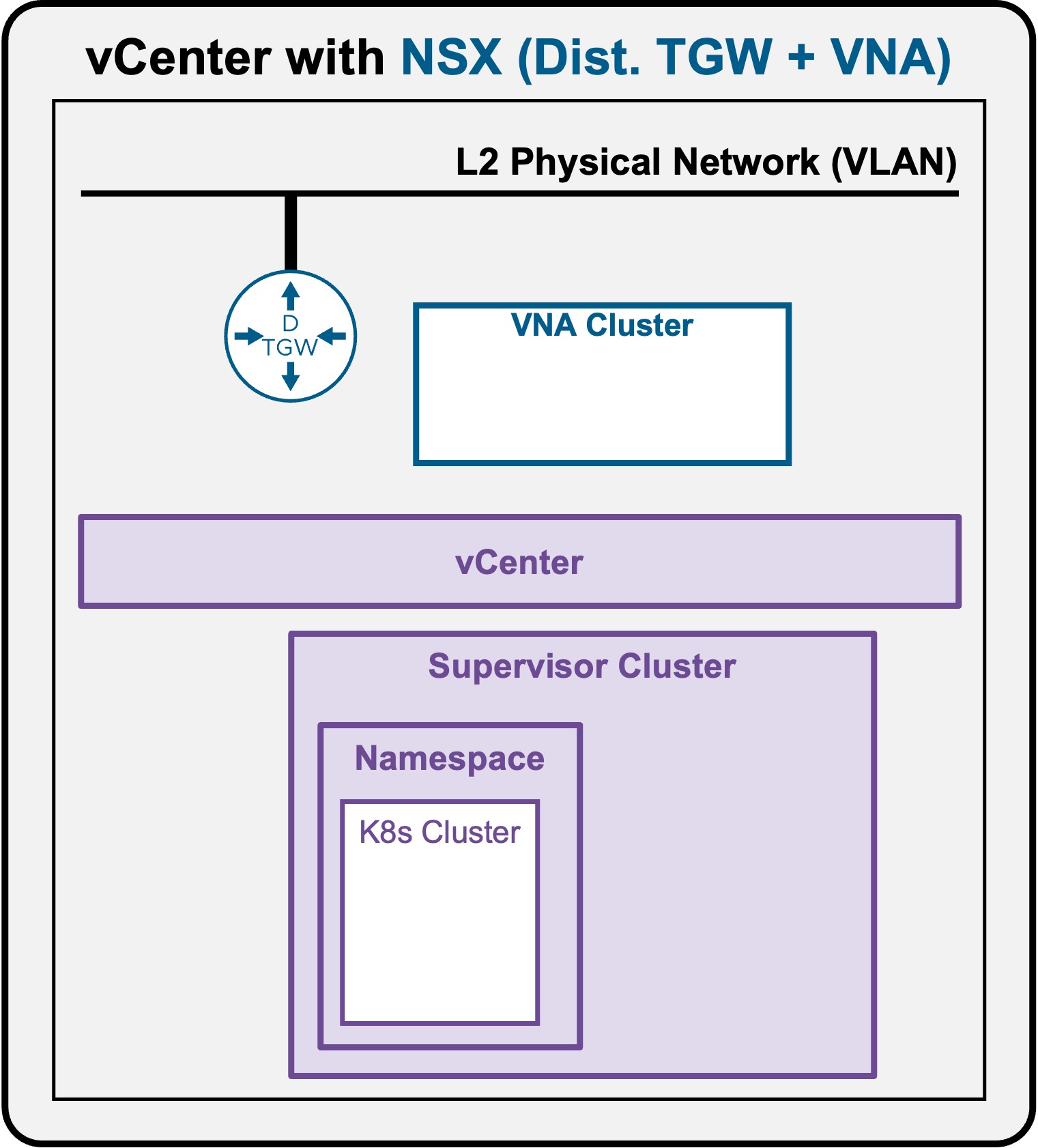
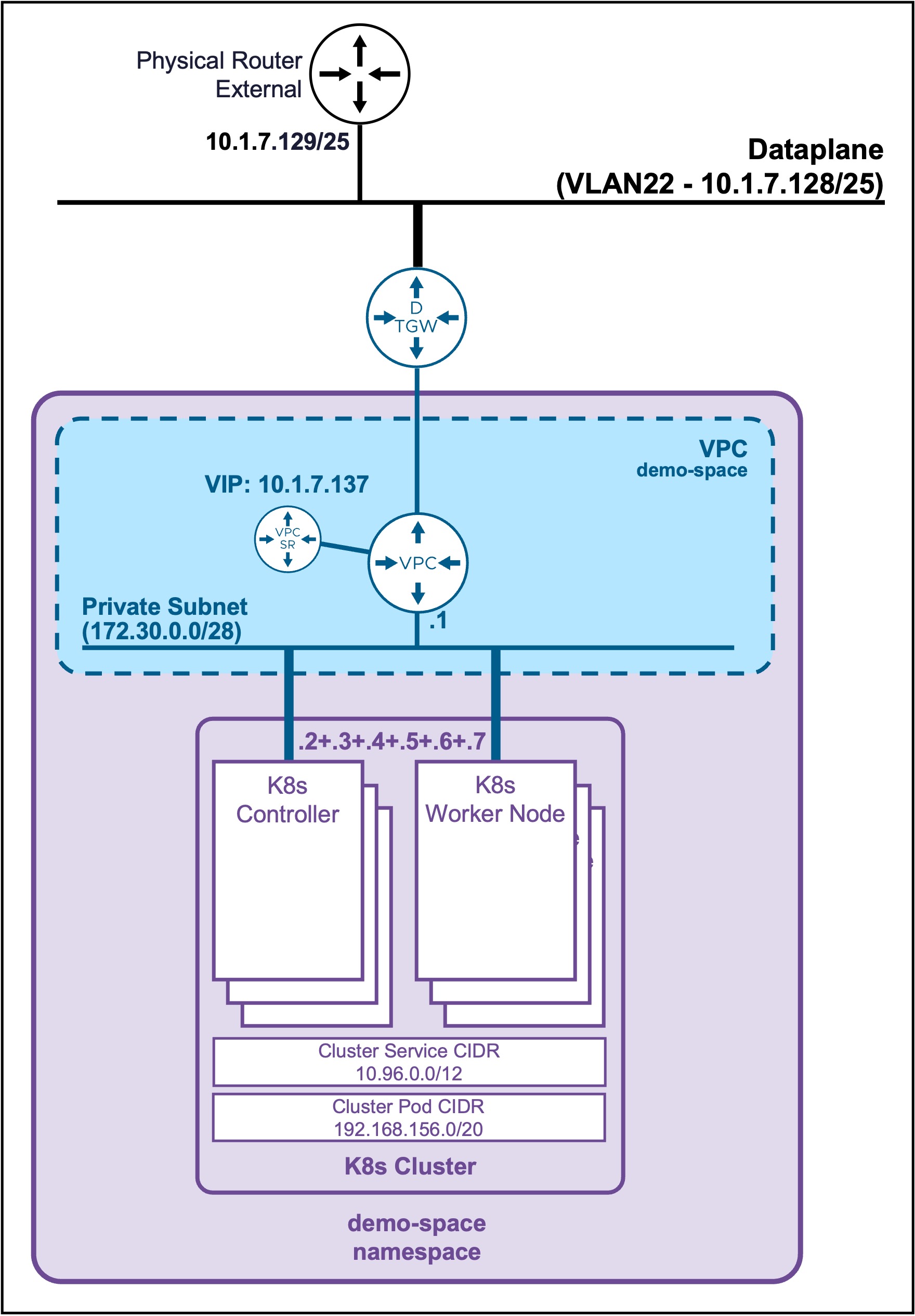
This section describes the procedures for deploying a K8s Cluster in a Namespace utilizing an "NSX + DTGW/VNA" architecture inside a vSphere environment.
K8s Cluster Deployment
Client Operating System
While the command outputs below are captured from a Windows client, the vcf and kubectl CLI tools operate identically across Linux and macOS environments.
Connect to the Supervisor Namespace
-
List the Supervisor Namespaces
vcf context listOutput example
PS C:\Users\Administrator\Documents> vcf context list NAME CURRENT TYPE supervisor-mgt false kubernetes supervisor-mgt:demo-space true kubernetes supervisor-mgt:svc-cci-ns-whl2t false kubernetes supervisor-mgt:svc-tkg-f0cpi false kubernetes supervisor-mgt:svc-velero-t234z false kubernetes -
Connect to the Supervisor Namespace
If the current context is not the good one, connect to the Supervisor Namespacevcf context use supervisor-mgt:demo-spaceOutput example
PS C:\Users\Administrator\Documents> vcf context use supervisor-mgt:demo-space
[ok] Token is still active. Skipped the token refresh for context "supervisor-mgt:demo-space"
[i] Successfully activated context 'supervisor-mgt:demo-space' (Type: kubernetes)
[i] Fetching recommended plugins for active context 'supervisor-mgt:demo-space'...
Create K8s Cluster
Check all K8s Cluster resources
-
Check TKR releases available
kubectl get kubernetesreleasesOutput example
PS C:\Users\Administrator\Documents> kubectl get kubernetesreleases NAME VERSION READY COMPATIBLE CREATED TYPEv1.35.5---vmware.1-vkr.1 v1.35.5+vmware.1-vkr.1 True True 4d8h< -
Check VM Class available
kubectl get virtualmachineclassOutput example
PS C:\Users\Administrator\Documents> kubectl get virtualmachineclass NAME CPU MEMORY best-effort-medium 2 8Gi best-effort-small 2 4Gi guaranteed-medium 2 8Gi guaranteed-small 2 4Gi -
Check Storage Class availablee
kubectl get storageclassOutput example
PS C:\Users\Administrator\Documents> kubectl get storageclass NAME PROVISIONER RECLAIMPOLICY VOLUMEBINDINGMODE ALLOWVOLUMEEXPANSION AGEvsan-default-storage-policy csi.vsphere.vmware.com Delete Immediate true 22h
Create the K8s Cluster yaml file
Create file "my-cluster.yaml"
my-cluster.yaml file
apiVersion: cluster.x-k8s.io/v1beta2
kind: Cluster
metadata:
  name: my-cluster
  namespace: demo-space
spec:
  clusterNetwork:
    services:
      cidrBlocks: ["10.96.0.0/12"]
    pods:
      cidrBlocks: ["192.168.156.0/20"]
    serviceDomain: "cluster.local"
  topology:
    classRef:
      name: builtin-generic-v3.6.0
    version: v1.35.5---vmware.1-vkr.1
    controlPlane:
      replicas: 3
    workers:
      machineDeployments:
        - class: node-pool
          name: workers
          metadata:
            annotations:
              cluster.x-k8s.io/cluster-api-autoscaler-node-group-min-size: "3"
              cluster.x-k8s.io/cluster-api-autoscaler-node-group-max-size: "5"
    variables:
      - name: vmClass
        value: best-effort-small
      - name: storageClass
        value: vsan-default-storage-policy
Deploy the K8s Cluster yaml file
kubectl apply -f my-cluster.yaml
Output example
PS C:\Users\Administrator\Documents> kubectl apply -f my-cluster.yaml
cluster.cluster.x-k8s.io/my-cluster created
Validate Deployment
Validate K8s Cluster Status
It takes around 5 minutes to get the K8s Cluster ready
kubectl get cluster
Output example
PS C:\Users\Administrator\Documents> kubectl get cluster
NAME         CLUSTERCLASS             AVAILABLE   CP DESIRED   CP AVAILABLE   CP UP-TO-DATE   W DESIRED   W AVAILABLE   W UP-TO-DATE   PHASE         AGE    VERSION
my-cluster   builtin-generic-v3.6.0   True        3            3              3               3           3             3              Provisioned   7m32s   v1.35.5+vmware.1
Retrieve K8s Cluster Controller VIP
kubectl get cluster my-cluster -o jsonpath='{.spec.controlPlaneEndpoint.host}'
Output example
PS C:\Users\Administrator\Documents> kubectl get cluster my-cluster -o jsonpath='{.spec.controlPlaneEndpoint.host}'
10.1.7.137
Validate K8s Nodes Status
kubectl get machines
Output example
PS C:\Users\Administrator\Documents> kubectl get machines
NAME                                   CLUSTER      NODE NAME                              READY   AVAILABLE   UP-TO-DATE   PHASE     AGE     VERSION
my-cluster-wglt6-dlpqm                 my-cluster   my-cluster-wglt6-dlpqm                 True    True        True         Running   5m57s   v1.35.5+vmware.1
my-cluster-wglt6-jv9t5                 my-cluster   my-cluster-wglt6-jv9t5                 True    True        True         Running   3m47s   v1.35.5+vmware.1
my-cluster-wglt6-n9m25                 my-cluster   my-cluster-wglt6-n9m25                 True    True        True         Running   109s    v1.35.5+vmware.1
my-cluster-workers-qjq5s-xj695-2kt4z   my-cluster   my-cluster-workers-qjq5s-xj695-2kt4z   True    True        True         Running   5m47s   v1.35.5+vmware.1
my-cluster-workers-qjq5s-xj695-dff4g   my-cluster   my-cluster-workers-qjq5s-xj695-dff4g   True    True        True         Running   5m47s   v1.35.5+vmware.1
my-cluster-workers-qjq5s-xj695-p55n8   my-cluster   my-cluster-workers-qjq5s-xj695-p55n8   True    True        True         Running   5m47s   v1.35.5+vmware.1