 Supervisor with "VDS + FLB"
This section describes the procedures for deploying an application (VMs/K8s) into the VKS Namespace utilizing a "VDS + FLB" architecture inside a vSphere environment.
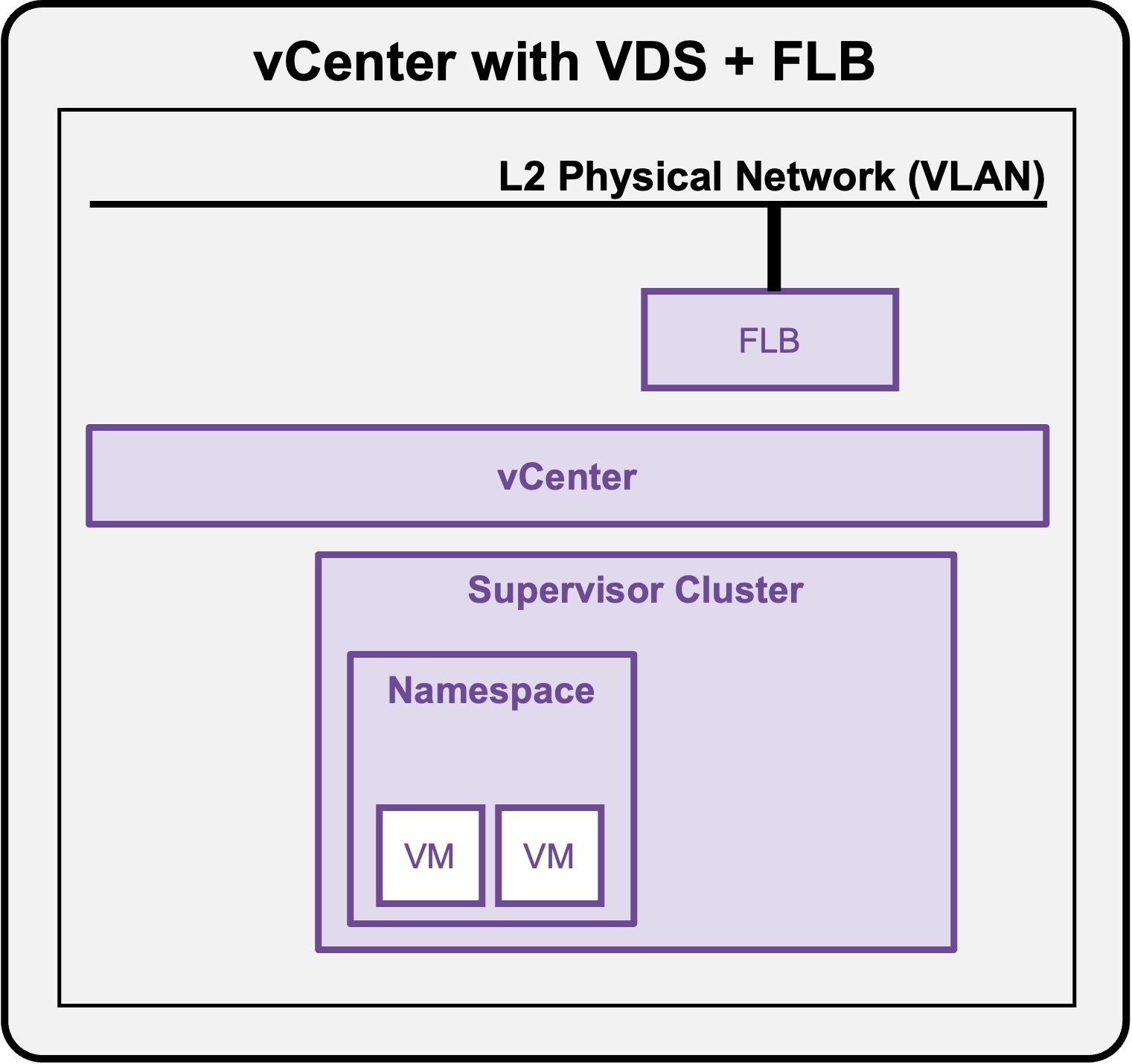
Deploy App (VMs)
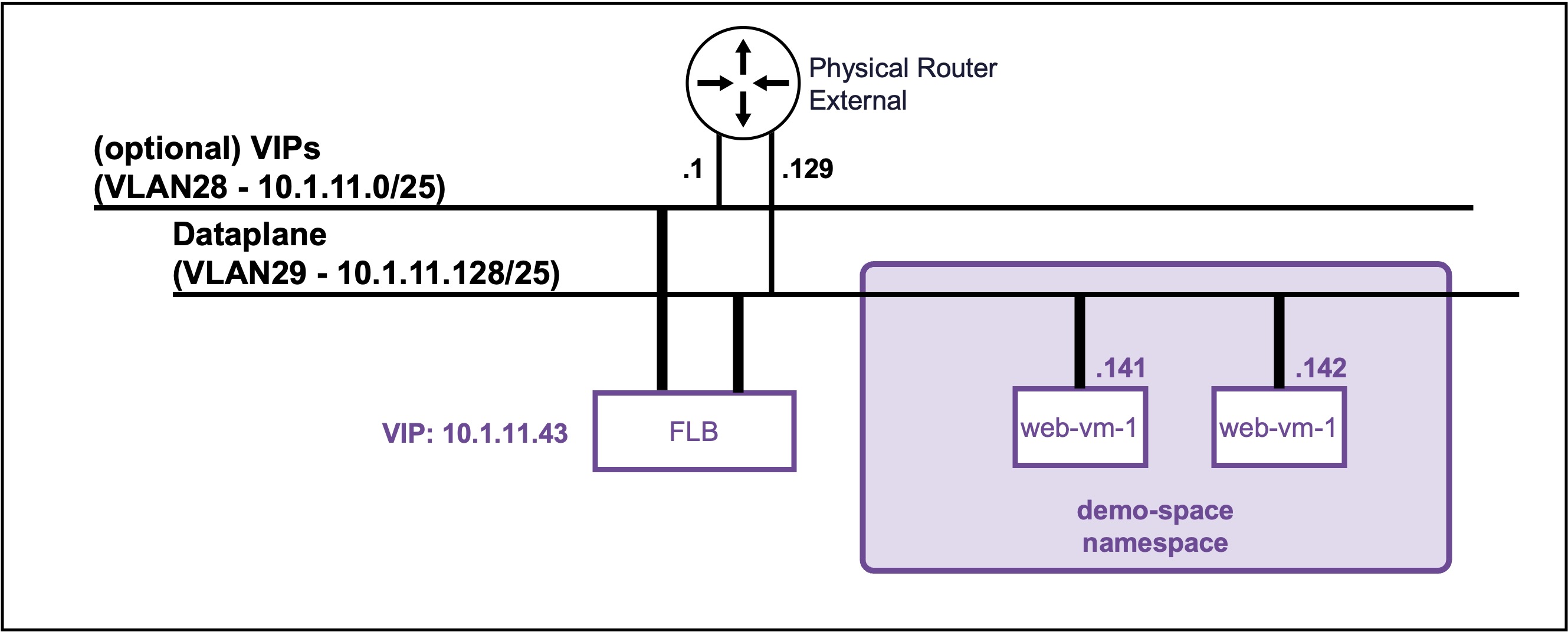
Client Operating System
While the command outputs below are captured from a Windows client, the vcf and kubectl CLI tools operate identically across Linux and macOS environments.
Deploy a Full Application (Load Balancer + VMs)
Connect to Supervisor Namespace
Create application (LB + 2 VMs apache) yaml file
Create file "my-web-farm.yaml"
my-web-farm.yaml file
apiVersion: v1
kind: Secret
metadata:
  name: ubuntu-cloud-init
  namespace: demo-space
stringData:
  user-data: |
    #cloud-config
    package_update: true
    packages:
      - apache2
      - unzip
      - open-vm-tools
      - net-tools
      - php
      - libapache2-mod-php

    # Create the user and add to sudo group
    users:
      - default
      - name: demouser
        groups: sudo
        shell: /bin/bash
        lock_passwd: false

    # Set the plain-text password and prevent it from expiring immediately
    chpasswd:
      list: |
        demouser:VMware123!VMware123!
      expire: false

    # Allow password authentication over SSH
    ssh_pwauth: true

    # Overwrite the default Apache page to show the VM hostname
    runcmd:
      - echo "<h1>Hello from $(hostname)</h1>" > /var/www/html/index.html
      - systemctl enable --now apache2
      - iptables -I INPUT 1 -p tcp --dport 80 -j ACCEPT

---
apiVersion: vmoperator.vmware.com/v1alpha5
kind: VirtualMachine
metadata:
  name: web-vm-1
  namespace: demo-space
  labels:
    app: web-pool                  # <-- The label tying it to the Load Balancer
spec:
  className: best-effort-small
  imageName: noble-server-cloudimg-amd64
  storageClass: vsan-default-storage-policy
  powerState: PoweredOn
  bootstrap:
    cloudInit:
      rawCloudConfig:
        name: ubuntu-cloud-init
        key: user-data

---
apiVersion: vmoperator.vmware.com/v1alpha5
kind: VirtualMachine
metadata:
  name: web-vm-2
  namespace: demo-space
  labels:
    app: web-pool                  # <-- The label tying it to the Load Balancer
spec:
  className: best-effort-small
  imageName: noble-server-cloudimg-amd64
  storageClass: vsan-default-storage-policy
  powerState: PoweredOn
  bootstrap:
    cloudInit:
      rawCloudConfig:
        name: ubuntu-cloud-init
        key: user-data

---
apiVersion: vmoperator.vmware.com/v1alpha5
kind: VirtualMachineService
metadata:
  name: web-lb-vip
  namespace: demo-space
spec:
  type: LoadBalancer
  ports:
    - name: http
      port: 80
      targetPort: 80
      protocol: TCP
  selector:
    app: web-pool
Deploy the application (LB + 2 VMs apache)
kubectl apply -f my-web-farm.yaml
Output example
PS C:\Users\Administrator\Documents> kubectl apply -f my-web-vm.yaml
secret/ubuntu-cloud-init created
virtualmachine.vmoperator.vmware.com/web-vm-1 created
virtualmachine.vmoperator.vmware.com/web-vm-2 created
virtualmachineservice.vmoperator.vmware.com/web-lb-vip created
Validate deployment of the application (LB + 2 VMs apache)
-
Check application VIP
kubectl get service web-lb-vipOutput example
PS C:\Users\Administrator\Documents> kubectl get service web-lb-vip
NAME         TYPE           CLUSTER-IP   EXTERNAL-IP   PORT(S)   AGE
web-lb-vip   LoadBalancer   10.96.0.81   10.1.11.14    80/TCP    41s
Load Balancer VM pool status
The Load Balancer does not offer VM pool member healthchecks.
If the VM or the application within the VM crashes, the load balancer will still use that member. -
Check application VMs
kubectl get virtualmachines -o wideOutput example
PS C:\Users\Administrator\Documents> kubectl get virtualmachines -o wide
NAME       POWER-STATE   CLASS               IMAGE                   PRIMARY-IP4    AGE
web-vm-1   PoweredOn     best-effort-small   vmi-08eb0c95fe03a262b   10.1.11.141    71s
web-vm-2   PoweredOn     best-effort-small   vmi-08eb0c95fe03a262b   10.1.11.142    71s
Access the application (LB + 2 VMs apache)
curl http://10.1.11.14
Output example
PS C:\Users\Administrator\Documents> curl http://10.1.11.14
<h1>Hello from web-vm-1</h1>

PS C:\Users\Administrator\Documents> curl http://10.1.11.14
<h1>Hello from web-vm-2</h1>